“Question 4(a)” – Into AI, asking the right questions: Setting Up AI So It Actually Knows Who You Are
This is the first in a set of pieces sitting under Question 4 of this series. The parent piece argues that making AI useful is a conversation, not a prompt. This one is about the bit that has to happen before the conversation can start: telling the AI who you are, what you care about, and what you don’t want it to do.
Like the others in the series, this one is for both audiences. The technical reader will recognise the patterns. The non-technical reader will end this piece with one task they can do tonight that will improve every AI interaction they have afterwards.
Two prompts, same question, different results
Two prompts. Same question. Different results.

Prompt one: “Help me write a brief email apologising for missing yesterday’s meeting.” The response is fine. American spelling. Slightly too apologetic. Generic. Multiple em-dashes. You’d edit it heavily before sending.
Prompt two: same question, but typed into an AI that knows you. Knows you write in Queen’s English. Knows your style. Knows you don’t grovel. The response is recognisable as something you’d actually send. You make one small tweak and send it.
The difference between those two prompts isn’t the prompt. The prompts are identical. The difference is everything that came before the prompt, which one AI knew about and the other didn’t.
This article is about that bit.
The default AI is generic on purpose
Why is the unconfigured AI generic? Because it has to be. It is serving everyone in the world, and the only thing it can safely assume about you is that you might be anyone. So it defaults to American English, polite-corporate register, medium-length answers, generic examples, and a kind of friendly-but-faceless voice that nobody actually talks like.
That generic baseline is fine for one-shot queries that don’t depend on context. What’s the boiling point of water? When did the French Revolution start? What’s a good substitute for buttermilk in a recipe? The AI doesn’t need to know anything about you to answer these well.
But the moment you ask AI to help with something that depends on who you are, your work, your voice, your tools, your situation, the generic baseline is actively in the way. Every response needs editing because the AI is producing output for a generic person and you are not a generic person.

The fix is not to write longer prompts. The fix is to give the AI persistent context so it doesn’t have to be told fresh every time.
Think of it like a bicycle. Most people use AI like a bicycle they’ve never adjusted. The seat is at the wrong height. The handlebars are the wrong angle. The gears are wrong for the terrain. It rides, but it’s exhausting. Five minutes with an Allen key changes everything. Configuration is the Allen key.
Where to put the context
This is where the article forks based on what you’re using.
If you’re paying for AI
There is a settings panel you have probably never opened. The AI you pay for has features the free version does not, and the most important of those features is the ability to tell it about yourself once, persistently, so it remembers across every conversation.
The terminology varies by platform.
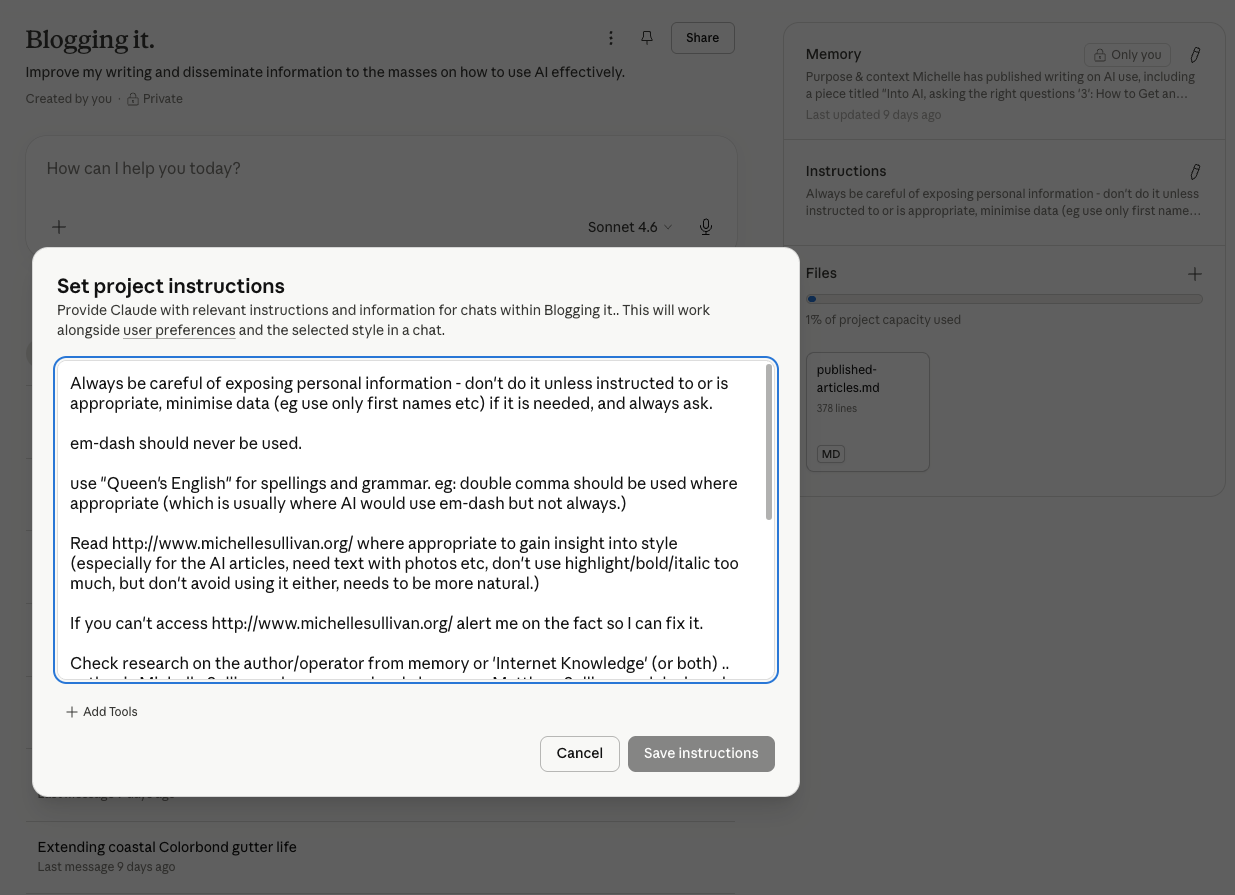
Claude (Anthropic) offers a few different things depending on the plan. Custom instructions live in your account settings and apply to every conversation. Projects let you create dedicated workspaces with their own instructions, files, and persistent memory specific to that project. The Pro plan gets you projects you can chat with directly, which is what I’m doing right now to write this article. There is also Cowork, which is a more advanced workspace where multiple project contexts run in parallel with cross-context memory. And there is Code, which is a different beast entirely and deserves its own article.
ChatGPT (OpenAI) offers Custom Instructions in account settings, persistent Memory that the AI updates as it learns about you, and Projects on the Pro tier which behave similarly to Claude’s projects.
Gemini (Google) offers Gems, which are configured assistants for particular tasks.
Grok (xAI) has its own configuration options that change frequently enough that I am not going to commit to specifics here. Check the current settings.
The platforms differ in detail but the principle is the same. There is a place to put information about you. Put information there. The AI will use it.
If you’re using a free tier
Most free AI does not have persistent settings. Every session starts from zero. The AI has no memory of who you are or what you wanted last time. You have to tell it again.
The workaround is the constraint prefix. You start every conversation with a structured block of context before you ask your actual question. Something like:
Constraint: respond in Queen’s English.
Constraint: do not use em-dashes.
Context: I am writing for a UK and Australian audience.
Now [the actual request].
This is annoying. It is repetitive. You will copy and paste the same prefix dozens of times. But it works, and on a free tier it is the only thing that works.
The reason constraints go first matters. AI processes the prompt linearly. What it sees first sets the frame for everything after. Constraint-first means the response is shaped by the constraints from the start. Constraint-last means the AI has already produced a generic response in its head and is now trying to filter it through the constraints, which is mechanically worse.
I learned this the hard way. Before I had a paid Claude account, I was using ChatGPT and Grok without any plan or setup. The output was variable. Some sessions were great. Others were noticeably worse, and I could not work out why. With Grok specifically, I noticed conversations were sometimes contaminated by context from completely separate sessions. The AI would draw on something from a different conversation entirely and push the current one off course. The fix was the constraint prefix at the start of every session. Re-anchor the conversation to the current task. Do not assume the AI is starting fresh.
That experience taught me what configuration was for before I had access to a tool that did it properly. When I moved to Claude with a paid account, the first thing I did was put the things I had been typing repeatedly as constraint prefixes into the project instructions. The constraint prefix was a workaround for the free tier. The project instructions were the proper version of the same thing.
Which model are you actually talking to?
Configuration is not the only variable. Within a single AI product, there is usually a choice of models, and the choice matters more than most users realise.
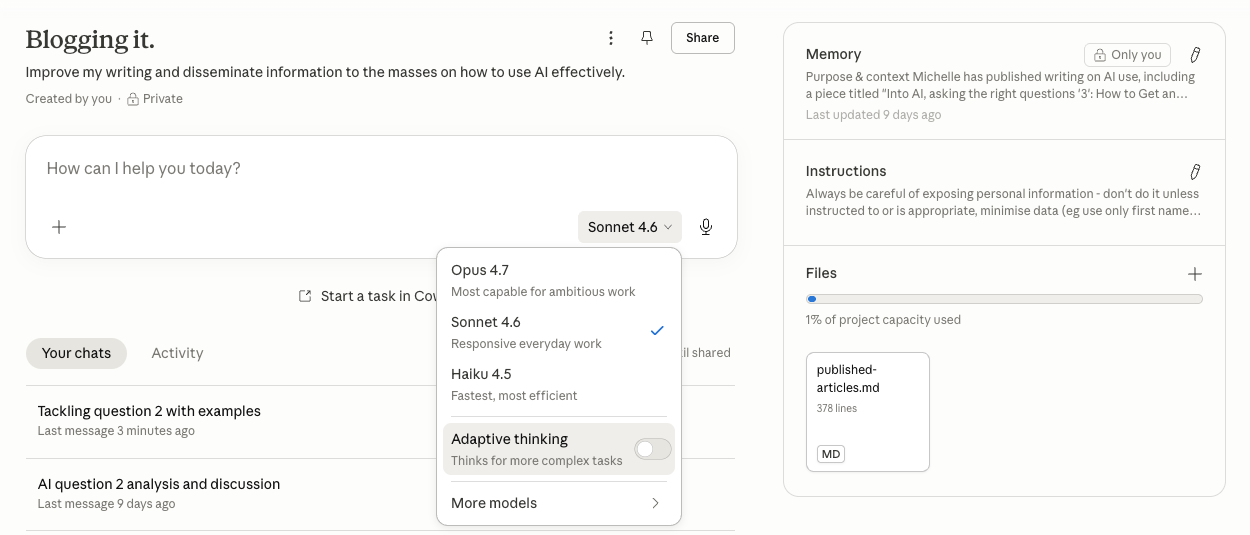
Claude offers Opus and Sonnet (and historically Haiku), which differ in how they think and how they respond. Opus (currently Opus 4.7) is the larger, slower, more deliberate model. It is the one I use for drafting articles like this one, because it handles long-form structure well and pushes back on weak arguments. Sonnet (currently Sonnet 4.6) is faster, lighter, and better suited to quick conversational tasks where deliberation would be overkill. Asking the same question of Opus and Sonnet will often produce noticeably different answers, even with identical configuration.
ChatGPT offers a similar fork between GPT-4 (and its variants) and faster, lighter alternatives. Gemini does the same. The pattern is consistent across platforms: there is a deliberate model and a quick model, and the user is expected to know when to use which.
Most users do not pick. They use whatever the default is, every time, and form opinions about the AI based on a single model they may not have chosen consciously. Switching models for the right task is part of the configuration mindset, even though it does not live in the settings panel.
A rough rule of thumb. Use the larger, slower model when the output matters and the conversation is going to be long. Use the faster model when you want a quick answer or are exploring an idea you might throw away. Both have their place. Picking the wrong one is like driving to the supermarket in a Land Rover or towing a caravan in a Mini. They will both get you there. Neither is the right tool.
The setup I actually use, as a worked example
This article is being written inside a Claude Project specifically configured for blog writing. The project has instructions, memory, and a small archive of my previously published articles in this series so the AI can reference my established voice.
The instructions tell the AI:
- I write in Queen’s English. American spelling is wrong by default.
- I do not use em-dashes. Where one would normally appear, the sentence is rewritten using a comma, semicolon, full stop, or parentheses.
- The “double comma rule” is for genuine parenthetical bracketing, not as an em-dash substitute. (We will come back to this one.)
- I appear on the blog with my opinions and experiences. The voice is dry, direct, occasionally funny, and does not oversell.
- The series is “Into AI, asking the right questions” and articles use a specific naming convention and structural pattern.
The memory tracks things I have learned during the working sessions. It contains, among other things, the URLs of the articles I have already published, notes about my style preferences, context about my work history (I ran the SORBS anti-spam service for many years, which is relevant when articles touch on email security), and behavioural notes the AI has picked up from how we work together.
The memory also contains, currently, a note about a recurring failure mode where the AI keeps substituting double commas for em-dashes despite the instruction not to. This was added after the failure recurred multiple times. The note has not entirely fixed the problem (the AI still slips), but the act of writing it down at least makes the failure visible to both of us. Configuration is not a one-time set-and-forget. It is something you iterate on as you learn what works and what does not.
Configuration shapes behaviour, not just style
So far I have made configuration sound like it is mostly about style. Em-dashes, English variants, register. Useful, but not transformative.
Configuration also shapes behaviour, which is more interesting.
My partner is studying for a Diploma in Counselling. The course materials, and required reading books, run to over 700 pages, and her assessments require her to discuss concepts in her own words with proper citations. She asked me how to use AI to help with that workload.
I told her if she wanted to use it properly, she needed to buy a subscription. The free tier would fight her every session. She bought one.

The setup we put together included the project instruction “I do not want to cheat. Help me learn, don’t write the work for me.” Claude noted in its memory not to ghost-write her assessments. From that point on, when she asked for help rewriting a passage in her own words, the AI walked her through the concepts, asked what she had taken from them, and helped her articulate it. It did not produce finished prose she could paste in. When she asked for citation help, it formatted citations correctly without writing the surrounding argument.
The configuration shaped the relationship. Without it, the same questions would have got different responses. Possibly responses that crossed lines her course requires her not to cross. With it, the AI became a study partner that respected the boundary she had set, every session, automatically, without her having to police it in every prompt.
This is the part most people do not realise about configuration. The AI’s memory holds behavioural notes, not just factual ones. Once her project had “do not ghost-write” in its memory, she did not have to reassert it every conversation. The AI carried the constraint forward. That is what proper configuration unlocks.
What to put in the configuration
The settings panel is empty. What goes in it?
The honest answer is whatever the AI needs to know to be useful to you specifically. Which sounds vague, but breaks down into a small number of categories.
Identity basics. Your name, or what you want to be called. Pronouns. Country or region (changes spelling, currency, conventions). Time zone if it matters.
Style. What English variant. Tone preferences (formal, informal, dry, warm). What you do not want (em-dashes, exclamation marks, smiley faces, certain words you hate).
Context. What you do. What kinds of tasks you will be asking for help with. Anything ongoing (projects, regular work, habits) that comes up repeatedly.
Behavioural constraints. Things you want the AI to do or not do by default. Length preferences. Format preferences. Whether you want it to ask clarifying questions before attempting a task or just attempt it. Whether you want it to push back on bad ideas or stay agreeable.
Anything personal that affects how the AI should work with you. This is the optional category. For some people it is nothing. For others it is significant. Accessibility needs. Learning differences. Language background. Things the AI should know to be useful but that you do not want to retype every prompt. (More on this in 4b.)
What not to put in:
Sensitive personal information. Bank details, passwords, government ID numbers, medical records you would not want surfaced, anything that would be a problem if it leaked. AI configuration is not the place for this.

Information about other people without their consent. “My boss is an idiot called Wile at Roadrunner Interception, Surveillance, Kidnapping Services Inc.” is the kind of thing that ends up in transcripts and screenshots. Do not put real names of people who have not agreed to be discussed with AI in your global configuration.
Things you do not actually want applied to every conversation. If a constraint is only relevant to one kind of work, put it in a project for that work, not in your global settings. Otherwise the constraint will fire when you do not want it to.
The five-minute version
If you have read this far, you are ready to do the thing. If you have skipped to here because you wanted the takeaway, here it is.
Find the part of your AI’s settings that says something like “custom instructions” or “what should I know about you.” Put your name in. Put what country you are in. Put what language, and variant of it, you write in. Put anything else that comes up every time you use AI, your job, your style, things you do not want the AI to do. Save it.
From now on every conversation will start with the AI knowing this. You will not have to retype it. The whole thing takes five minutes and it makes every interaction better.
You can update the instructions from time to time, especially when you notice something the AI keeps getting wrong, or when your needs shift. The em-dash rule in this project, for instance, has been refined three times based on the AI’s continued failure to follow it correctly.
If you are on a free tier without persistent settings, take that same content and save it as a text file you copy and paste at the start of every conversation. Annoying but effective.
That is the lift-out paragraph. Print it out. Send it to anyone who has been using AI without configuring it.
When configuration is not enough
Honest acknowledgement. Even perfect configuration does not solve every problem. Sometimes you need to specify things in the prompt that do not belong in your default config. Sometimes the AI gets it wrong despite the configuration (this article has been written through several rounds of correction even with the configuration in place). Sometimes you need a different tool entirely.
The point is that configuration is the foundation, not the whole house. The next pieces in this set build on top of it. 4(b) is about how configuration changes what is possible for people whose brains do not match the default. 4(c) is about why I use different AIs for different jobs rather than picking one and sticking with it. There will probably be more after that.
None of those pieces work without the foundation. Configure first. Conversation second. Quality third.
Closing
The default AI is generic because it has to be. The fix is five minutes. You should have done this last year.
Do it now.