
“Question 2” – Into AI, asking the right questions: How to Spot Email Scams
This is the second in a series demonstrating how AI can help us investigate the systems shaping our world. The first looked outward, at ecosystems and economics, and who pays when natural systems fail. This one looks at something closer to home, that lands in your inbox every day, and asks why we are still so bad at handling it.
A note before we start. This article is long. Longer than the others in the series, by some margin. That is deliberate, because the subject genuinely is more complicated than it should be, and the people most affected by it have been most failed by simple answers. If you can spare twenty minutes and a coffee, I think this one earns the time. If you can’t, the two rules below are what you need. The rest is the argument for why.

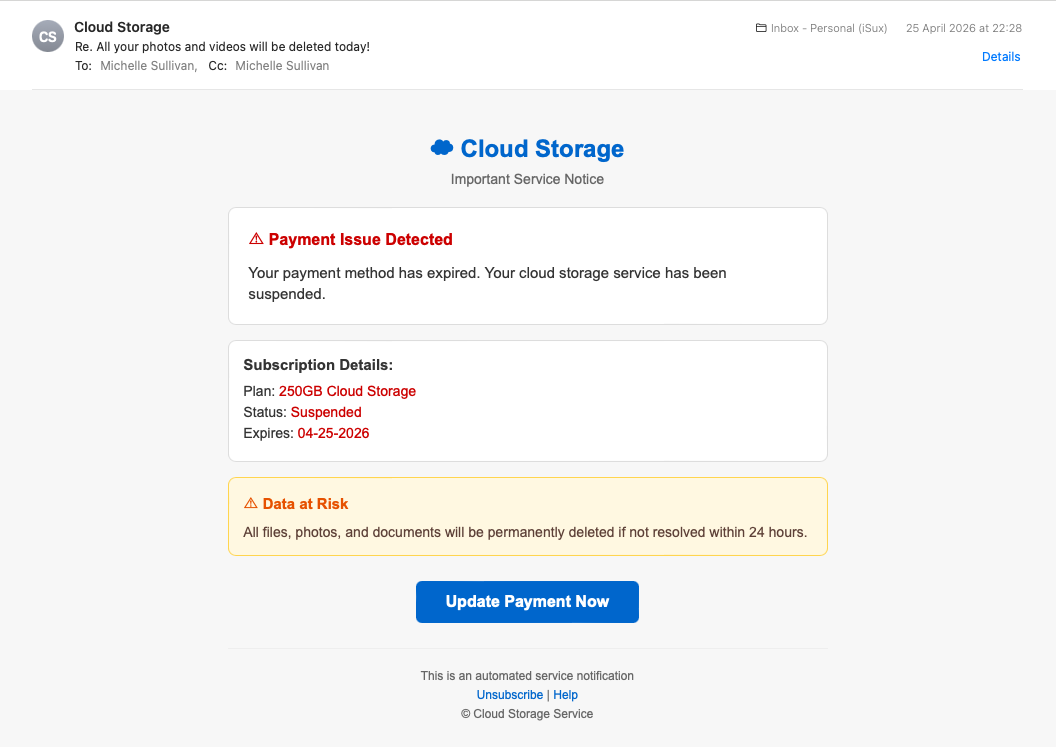
It’s eleven o’clock on a Sunday night. You’re in bed, half-watching something on the iPad, and an email pings into your phone. The subject line says all your photos and videos will be deleted today. The sender is “Cloud Storage.” There’s a button that says “Update Payment Now,” a red banner warning of a payment issue, and a 24-hour countdown before everything goes.
Your photos. The grandkids. The holiday in Bali. The dog before the dog died.
What do you do?
This is not a hypothetical. The following image landed in my personal inbox at 22:28 on Saturday 25 April 2026. It was the sixth in a series of nearly identical emails that arrived over four days from three different sender domains. I’ve worked in email security for years and I still had to look twice, because that’s the moment they’re built for. The tired moment. The half-attention moment. The moment when whatever defences you have are at their lowest.
Most articles about phishing would now hand you a checklist. Look for poor grammar. Look for urgency. Look for mismatched URLs. Hover over the links. Check the sender’s domain.
I’m going to do something different.
I’m going to give you two rules, both of which are older than the iPhone, both of which still work in 2026, and neither of which require you to inspect anything, install anything, or learn anything you don’t already know. Then I’ll show you what AI adds for the cases where the two rules need a second opinion, and I’ll be honest about who can and can’t easily reach those tools today.
If you’re the family techie, this article is also for the parent or grandparent you keep rescuing from these. The two rules are what you teach them. The AI part is what you do for them when they forward you something they’re not sure about. That’s already what happens in millions of households. I just want to give the technique a name and the conversation better language.
The rule that has worked for twenty-one years
In 2005 I appeared briefly on 10 News from Sydney, talking about email scams. The advice I gave then was fourteen words long.
If you don’t know what it is, or who it’s from, delete it.
Twenty-one years later I have not had to update it.
This is not because phishing has stood still. Phishing has evolved enormously. The grammar problem is fixed (AI now writes the emails). The design problem is fixed (modern scam emails use Apple’s own design language, with system fonts and squircle icons and all). The sender-spoofing problem is partly fixed (some scams now arrive from genuinely well-reputed sending infrastructure, including Google Cloud). The urgency cues are smoother, the call-to-action buttons are prettier, and the entire production value has lifted.
What hasn’t changed, and cannot change, is this: a scam email is by definition pretending to be from someone who is not actually contacting you about a thing that is not actually happening in your life.
Apply the rule to the cloud storage email. Do you have an account with “Cloud Storage”? No. Nobody does. It’s not a real product. It’s a deliberately vague name designed to catch anyone who pays for cloud storage anywhere. iPhone users with iCloud. Android users with Google One. Anyone with Dropbox or OneDrive. Anyone whose phone has ever shown them an “almost full” warning. Real providers always name themselves. Apple emails say Apple. Google emails say Google. The moment a sender is being deliberately vague about which company it claims to be, the rule has already given you the answer.
Delete. Done. No analysis required.
But what if you do have the account?
The rule handles most of what hits your inbox. Most. Not all.
Sooner or later, an email arrives that gets past the first hurdle. You do have an iCloud account. You did order something from Amazon recently. You do bank with NAB. The sender is naming a real institution you have a real relationship with, about a thing that’s plausibly real. The rule has run out, because the answer to “do I know who this is from?” is now, possibly, yes.
This is the moment most people stop thinking and start clicking.
It’s also the moment to apply the second rule, which is almost as old as the first.
Real institutions don’t deliver decisions to your inbox.
When your bank wants you to do something, it puts a notification in the bank’s app, on the bank’s website, in your account portal. The email, if there is one, says “there’s a notification waiting for you, please log in to see it.” It does not say “click here to verify your account.” It does not say “your access will be suspended in 24 hours unless you click this button.” It does not include a payment link.
When Apple wants you to update your storage plan, it does it in the Settings app on your phone. Not in an email. Not via a button. In the place you already go to manage your Apple account, which is the device you’re holding.
When the Tax Office wants you to do something, they write you a letter. Yes, an actual letter. On paper. With a stamp on it. The reason they still do this in 2026 is because real institutions cannot rely on email to deliver decisions, because email cannot be trusted to deliver decisions, and because they know this even if their customers don’t.
Apply the second rule to the cloud storage email. The email is asking you to update your payment by clicking a button inside the email. A real cloud provider would never do this. They would suspend the service in the app. They would show you a notification when you next opened the photos app. They would put the warning where you already go to manage the account. They would not deliver the decision via a button in an email at 11pm on a Sunday.
The email has failed the second rule. Delete. Done. Still no analysis required.
These two rules, between them, dispatch nearly everything that lands in an ordinary inbox. They don’t require you to spot mismatched URLs. They don’t require you to inspect headers. They don’t require you to know what DKIM is, or what a sender domain is, or what “phishing” means as a technical term. They require you to ask two questions, both of which can be answered in the time it takes to read the subject line:
Do I know what this is, and who it’s from?

Is this email asking me to act inside the email itself?
If the answer to the first is no, delete. If the answer to the second is yes, delete.
If the email is real and you’ve deleted it by mistake, the institution will find another way to reach you.
They have your address. They have your phone number. They have the app on your phone. They have many ways to tell you something matters, and email-with-a-button is the worst of them.
These two rules fit on a fridge magnet. Print them out. Give them to your mum.
The same fortnight, same inbox, very different scams
The first cloud storage email arrived on Saturday 25 April 2026. It was the latest in a campaign of at least six near-identical sends across four days, from three rotating sender domains. They were crude. The visual design was passable but unremarkable. The grammar was fine. The English was idiomatic enough not to be obviously foreign-written. To the trained eye, they were unmistakable as scams within seconds. To a tired eye on a small phone screen at 11pm, they were exactly designed to slip past.
But these were not the most sophisticated phishing emails I received in April.
Two weeks earlier, on the 14th and 15th, two other emails landed in the same inbox. They came from different sending infrastructure, different sender domains, and a clearly different operator. They looked like this:
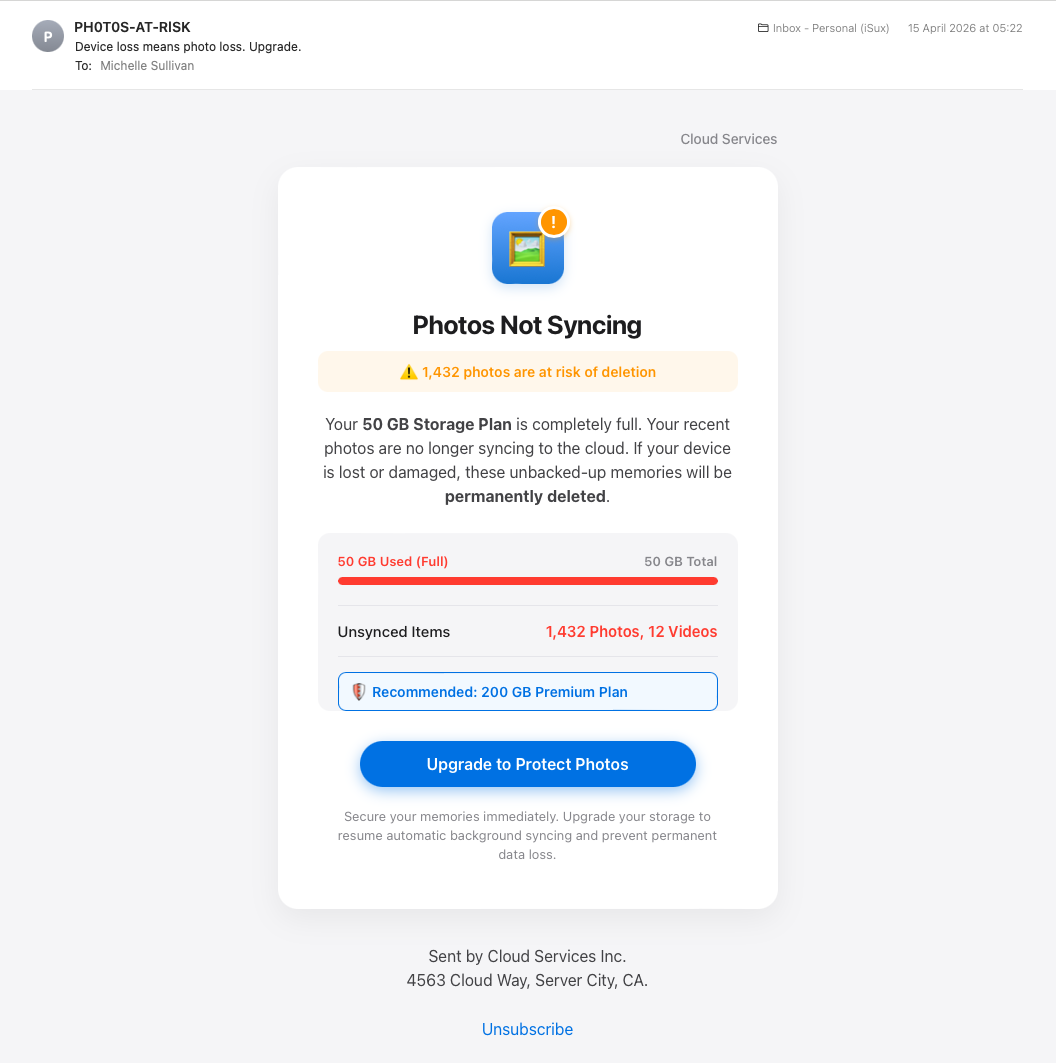
…and another…
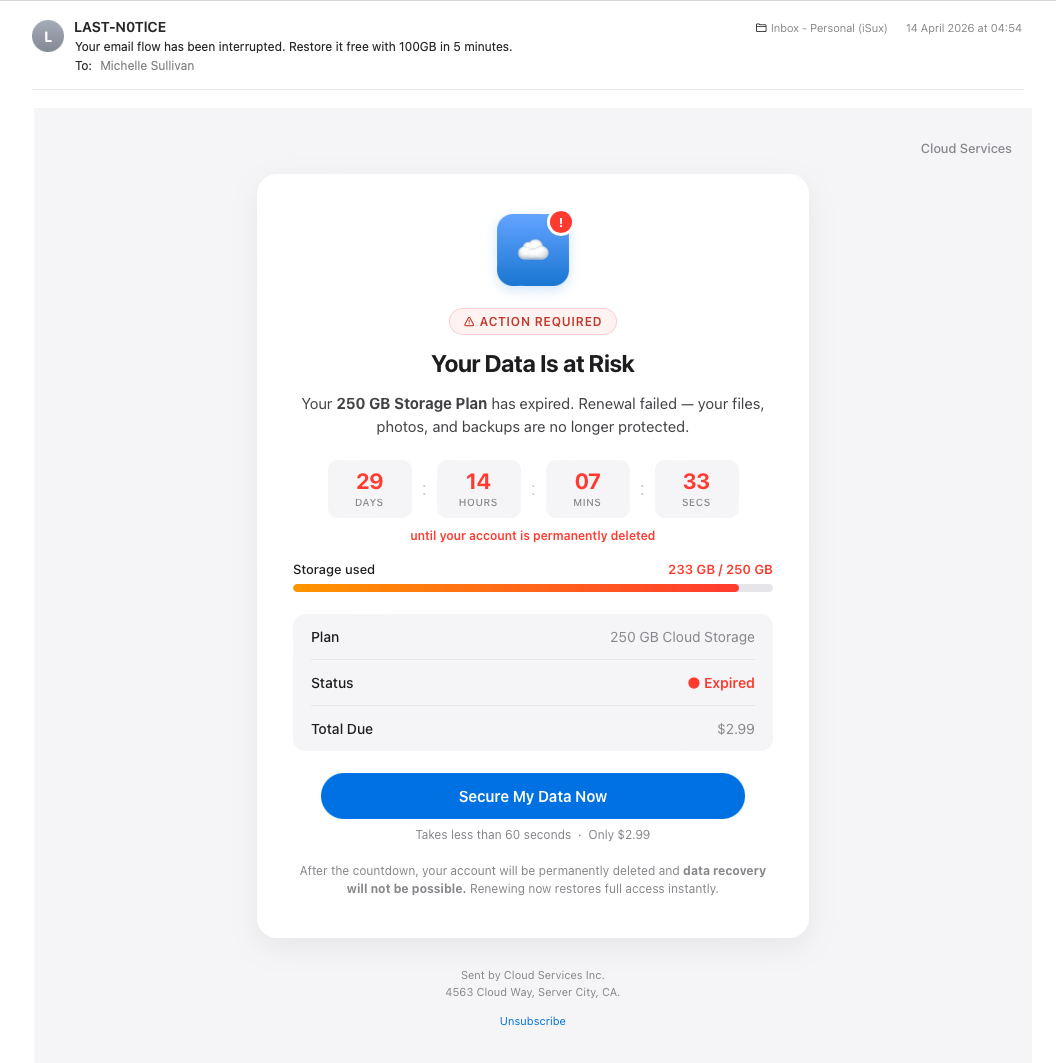
Look at them. Really look. These are not crude.
The design language is iOS. System fonts. Squircle icons. Notification badges. Apple’s exact colour palette. That specific blue gradient. That specific orange warning. That specific red for critical alerts. The progress bars. The pill-shaped buttons. The card-on-card layout. Someone has read Apple’s design guidelines and built emails that pretend, plausibly, to be system notifications from your phone rather than emails at all. The second one even includes a live JavaScript countdown timer, ticking down second by second to your “permanent account deletion.”
The sender display names are PH0T0S-AT-RlSK and LAST-N0TlCE. Look closely. The O in PHOTOS is a zero. The I in NOTICE is a lowercase L, or a 1, depending on the font. These substitutions are not because the scammers can’t spell. They are deliberate, designed to evade the keyword filters that would catch the words “photos at risk” or “last notice” written normally. The substitutions are visible to a human reader as those words. Your eye reads through them. But they are invisible to the text-pattern matchers that anti-spam systems use.
These two emails arrived a week and a half before the cruder Cloud Storage cluster.
This is the part the security industry’s “rising sophistication” narrative gets wrong. Phishing in 2026 is not on a smooth upward curve from crude to sophisticated. The same fortnight, the same inbox, can deliver both registers from different operators running in parallel. The market for fake cloud storage warnings is now competitive enough to support multiple players at multiple price points.
Some of what lands in your inbox is crude enough that the two rules dispatch it instantly. Some of what lands is polished enough that the visual signs are no longer visible to ordinary inspection. The lesson is not that the floor is rising. The lesson is that the range is too wide for visual assessment to be reliable. You cannot tell from looking. You cannot tell from looking even if you have spent twenty years looking.
The two rules survive this because they don’t depend on looking.
Apply rule one to all three. You don’t have a “Cloud Storage” account. You don’t have a “PH0T0S-AT-RlSK” account. You don’t have a “Cloud Services Inc.” account. None of these are real companies. Every one of them deliberately avoids naming an actual provider you might have a relationship with, because doing so would limit their target audience to that provider’s customers. Vagueness is the feature.
Apply rule two to all three. Every one of them is asking you to act inside the email. Click the button. Pay the $2.99. Update the payment method. Beat the countdown timer. Real Apple, real Google, real Dropbox would never deliver a decision this way.
The rules don’t care how good the design is. The rules don’t care about the squircle icons or the JavaScript timer or the system font. The rules don’t care because the rules operate at a level the design cannot reach.
Why nobody teaches it this way
Here’s the part of the article that may be uncomfortable for some readers, and especially for the readers who, like me, work in the security industry.
The corporate phishing-training industry, including the company I work for and most of its competitors, has spent the better part of two decades teaching people to spot phishing using checklists. Look for poor grammar. Look for urgency language. Look for mismatched URLs. Hover over the links before you click. Check the sender’s display name against the actual address. Look for generic greetings like “Dear customer.” Watch for emotional manipulation.
All of this advice is technically correct. Most of it is also useless in practice, and some of it is now actively misleading.

The grammar test is broken because AI now writes the emails. The cloud storage scam I opened with has perfect grammar. The polished pair from mid-April have perfect grammar. The grammar test catches phishing from 2015, not phishing from 2026.
The urgency test is broken because urgency is now built so smoothly into the design language of legitimate notifications that it no longer reads as a warning sign. Real banking apps use red banners and exclamation marks. Real delivery services send “action required” emails. The visual vocabulary of urgency has been standardised across legitimate and illegitimate communications, and the human eye has stopped being able to distinguish them on the basis of urgency alone.
The mismatched URL test is broken because the mismatches are now invisible at a glance. The polished pair from April send their phishing pages to storage.googleapis.com. That is a real Google domain. It belongs to Google. It resolves cleanly, has valid certificates, and passes every reputation check. The fact that anyone can host arbitrary content on Google Cloud Storage means that “real Google domain” is no longer a meaningful indicator of legitimacy. The same is true of Dropbox, OneDrive, and most other major file-sharing services, all of which routinely host phishing pages alongside their legitimate users. A user who has been trained to “check the URL is from a real company” will see googleapis.com or dropbox.com and feel reassured. The training has, in this case, made them less safe rather than more.
The “hover over the link” advice does not work on a phone, where most email is now read.
The “check the sender’s display name” advice does not survive Unicode substitution. PH0T0S-AT-RlSK passes a casual visual inspection as PHOTOS-AT-RISK. The training does not warn about this because the training was written before Unicode substitution became common.
I could keep going. The point is not that any individual checklist item is wrong in principle. The point is that the entire approach, asking ordinary humans to do conscious analytical pattern-matching against a list of signs, on a small screen, while tired, has been failing for years and is now failing harder than ever. The threat has evolved past the curriculum. The curriculum is updated periodically, but it can never catch up, because new evasion techniques appear faster than training modules can be revised, reviewed, approved, translated, and deployed.
There is also a second failure mode, and this one is harder to talk about because it indicts the test rather than the training.
Most corporate phishing tests punish the behaviours that real security analysis requires.
I have, on multiple occasions, across multiple training providers used by multiple employers in this industry, past and present, been flagged by phishing-test systems for doing the exact things a competent analyst should do. Forwarding a suspicious email to an analysis tool. Opening it in a sandboxed environment to inspect the source. Pasting it into a security AI to ask what it actually contains. The training systems detect these behaviours as “the user clicked something” and mark the user as having failed the test. The user is then required to take additional remedial training, designed for users who fall for phishing.
I am not making this up. I see thousands of real phishing URLs every week as part of my work. I help build defences against the things this training claims to teach about. And I have been failed by the training, repeatedly, for using the same techniques I use professionally to analyse real attacks.
This is not an unusual experience. Talk to almost any security analyst in any large organisation and they will have a version of this story. The corporate-training industry has built a system that punishes the right answer because the right answer is indistinguishable, to a click-tracking tool, from the wrong answer. Forwarding to AI looks like clicking the link. Opening in a sandbox looks like opening on the desktop. The system cannot tell the difference, and instead of solving that problem, the system has decided that everyone who triggers it is wrong.
The result is predictable. Users who should be doing serious analysis on suspicious emails learn not to, because the analysis itself gets them in trouble. Users who can’t do serious analysis learn nothing useful, because the training was never going to fit in their head anyway. And the people running the training programmes get to publish reports about how many users completed the modules, which is not the same thing as how many users would now correctly handle a real attack.
The training is not failing because the trainers are stupid. The training is failing because the entire premise is wrong.
The premise is that ordinary humans, given enough information about how phishing works, can learn to identify it visually. That premise was wrong in 2005 and it is more wrong in 2026. Humans cannot reliably visually identify phishing, because phishing now looks identical to legitimate communication, and because the moment the human is asked to do this work is exactly the moment they are least able to do it.
The two rules above don’t ask for visual identification. They ask two questions that don’t depend on what the email looks like. That is why they have survived twenty-one years of attacker innovation, and why they will survive the next twenty-one.
So where does AI actually fit?
Up to this point I have not asked you to use AI at all. The two rules dispatch nearly everything. The training-industry critique is a critique of a system, not a recommendation to install something new. If the article ended here it would still have done useful work.
But the article doesn’t end here, because there is a real category of email the two rules struggle with, and that is where AI earns its place.
Consider an email that genuinely appears to be from a service you do use, about something that genuinely could be happening, and that doesn’t obviously violate the second rule. A real-looking notification from Apple, on a day when your iCloud might genuinely be approaching its limit, that asks you to log in via what appears to be a legitimate Apple link. A bank email referencing a transaction you can’t quite remember whether you made or not. An invoice from a courier when you are, in fact, expecting a parcel.
The two rules narrow this category enormously, but they don’t eliminate it. And in this category, the visual signs that the training has been teaching for years are now genuinely beyond ordinary human ability to detect. Not because the human is stupid. Because the signs are too small, too technical, or too well disguised.
This is where AI is a legitimately useful second opinion.
Take the cloud storage email I opened with. To the human eye, looking at it on a phone at 11pm, it presents as a moderately convincing service notification. The design is unremarkable but plausible. The button looks like a button. The branding is vague but not implausibly so.
Paste the source code of that email into any major AI assistant and ask: what is this email actually doing, and what is it actually asking me to do?
Within seconds, the AI will tell you, in plain English, things like:
The sender’s display name says “Cloud Storage” but the actual sending domain is depadjust.com, which has no relationship to any legitimate cloud storage provider. The domain’s authentication signature (DKIM) fails because the keys aren’t published in DNS, which is something a real provider would never get wrong. The email is also Cc’d to your own address, which is a common sender-address-spoofing technique. The button labelled “Update Payment Now” links to a domain called trendfa.poo.li, which is not a payment processor for any real service. And, this is the part the human eye cannot see at all, the entire background of the email is itself a hidden link to the same scam URL. If the user taps anywhere on the email, not just on the button, they go to the scam page. The HTML even includes a comment from the scammer explaining this trick to themselves.
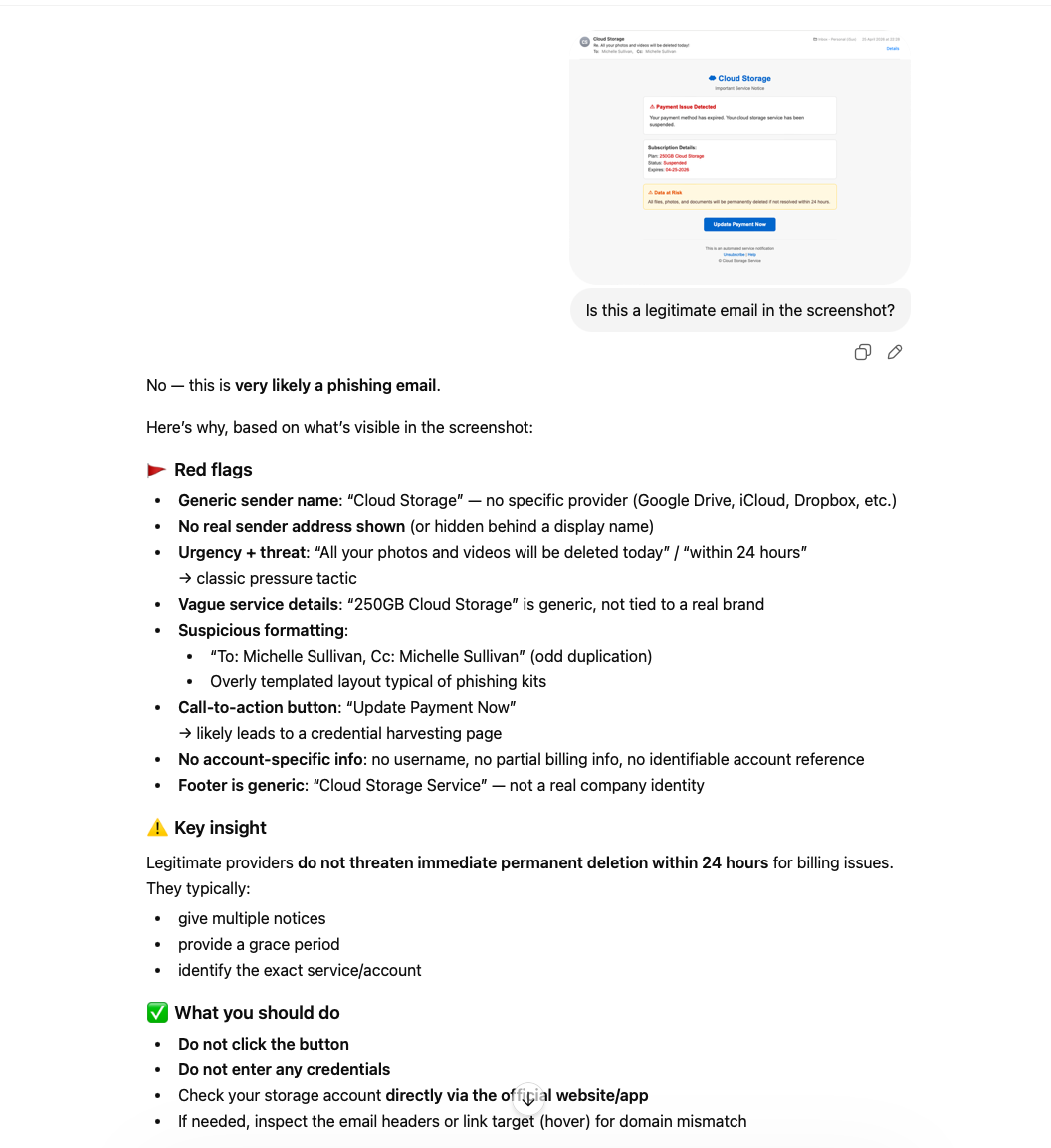
None of that requires the user to know what DKIM is. None of that requires the user to read HTML. The AI has done the work that twenty years of security analysts used to do by hand, and it has done it in plain English, in seconds, for free.
This is what AI is for.
It is not for replacing the two rules. The two rules dispatch the vast majority of phishing without ever needing AI. AI is the second opinion for the residual category that survives the rules, where the human genuinely cannot tell, and where the signs that would resolve the question are buried in technical layers the human cannot easily inspect.
AI does not make the human a better phishing-spotter. AI makes the human’s existing instincts trustworthy, by handling the cases where instinct alone is no longer enough.
This is a different relationship to AI than the one the security industry has been talking about. The industry frame is AI as threat (the scams are getting better) or AI as replacement (let the tool decide for you). The frame I’m offering is AI as second opinion. The human still makes the decision. The human still applies the rules. The AI is the colleague you ask when you’re not sure. Patient, available, free, and capable of seeing things you genuinely cannot.
And here, at last, we have to deal with the elephant in the room.

The people who need this most are the people who can least easily get it
Let’s be honest about who, exactly, has been doing all this paste-into-AI analysis throughout this article.
It hasn’t been my mum.
The technique I have been describing requires a baseline of digital comfort. Take a screenshot. Copy the source. Open an AI assistant. Paste it in. Read the response. Decide what to do. All of that requires a meaningful portion of the population to have skills they simply do not have. Not because they are unintelligent. Not because they are lazy. Because they were never taught, the security industry never noticed, and the technology landscape has moved past them faster than anyone has stopped to bring them along.

The people most targeted by these scams are often the people least equipped to use the techniques that would protect them. Older users. Less digitally fluent users. Users on phones rather than computers. Users who have one email account, accessed through whatever app came with the device, with no broader software ecosystem to draw on. Users for whom “take a screenshot” is a vague concept their grandchildren do effortlessly and they have to ask about every time. Users who have heard of ChatGPT the way they have heard of cryptocurrency, as something other people do.
If the answer to phishing is “paste it into AI,” the answer fails the people most exposed.
This is not a criticism of those users. It is a criticism of every part of the security ecosystem that has assumed they would somehow catch up, when the entire trajectory of the threat has been moving in the opposite direction.
So what do you actually do?
For the article’s first audience (the family techie, the IT-literate adult child or grandchild, the friend whose number gets called whenever something goes wrong with the Wi-Fi) the answer is to be that second opinion yourself. The two rules are what you teach. The AI part is what you do for them when they forward you something dodgy. This is already what happens in millions of households. The article is just naming it.
For the second audience, the mum and dad, the grandmother, the uncle who keeps almost falling for these, the two rules are the answer. They are what go on the fridge magnet. They do not require any new technology, any new app, any new skill. They require remembering two questions. That is achievable. That is what the rest of the article has been arguing for.
But there is a third group, and they deserve a paragraph of their own.
The third group is the targeted ones. The retiree whose details have already been sold on, who is being pursued by sophisticated operators specifically because their demographic is profitable. The person who has already been scammed once and has been put on the “responds to scams” list that gets traded between criminal operations. The person who can’t easily use AI tools, can’t easily ask a relative for help, and is being hit with attacks that have been crafted carefully enough that even the two rules might not be obvious to apply.
For this group, no amount of training is going to be enough. Not because the rules don’t work, but because the cognitive load of applying them, on every email, in every moment of distraction, against attackers who are professional and patient, is more than any human should be expected to bear.
The honest answer for this group is not better training. It is better tooling.
The right place for the second opinion is not in a separate AI tool the user has to learn to use. The right place for the second opinion is the inbox itself, applying the two rules and the AI analysis automatically, before the dangerous version ever reaches the human’s eye. That is a tooling problem, not an education problem. And it is the problem that no amount of training-industry investment will ever solve, because training-industry investment is structurally incentivised to keep selling training rather than admit that training is the wrong answer.
This is not an entirely solved problem yet. There are projects working on it. I am, in my own time, working on one such project called Privacy Direct, which is not finished, not ready for non-technical users yet, and not the subject of this article. But it is the shape of the right answer: tooling that does the work where the user already is, without requiring them to learn anything new.
There will be others. There need to be others. The security industry has spent two decades selling training that fails the people most exposed. The next two decades will be spent, hopefully, building tools that do not.
Twenty-one years on
The advice in 2005 was fourteen words. The advice in 2026 is fourteen words and one footnote.
If you don’t know what it is, or who it’s from, delete it.
And, if it’s asking you to act inside the email, delete it anyway.
The footnote is AI, for the cases that survive both rules and where the human genuinely cannot tell. Used as a second opinion, not as a replacement for judgement. Used by the people who can reach it, on behalf of the people who cannot. Used as a colleague rather than as an oracle.
The footnote is also Privacy Direct, and whatever else gets built in the years to come, because the long-term answer is not training and never was. The long-term answer is tools that do the work where the user already is, without requiring them to become security analysts in their spare time.
But the headline is still the rule.
If you don’t know what it is, or who it’s from, delete it.
It worked in 2005. It works in 2026. It will work in 2046.
The bit that’s changed is who we expect to apply it.